Labor is the single largest expense for most restaurants, and for growing SMBs it's often the hardest to track accurately. When your team clocks in on paper or through disconnected apps, you lose visibility into overtime, missed punches, and scheduling gaps that eat into margins every pay period.
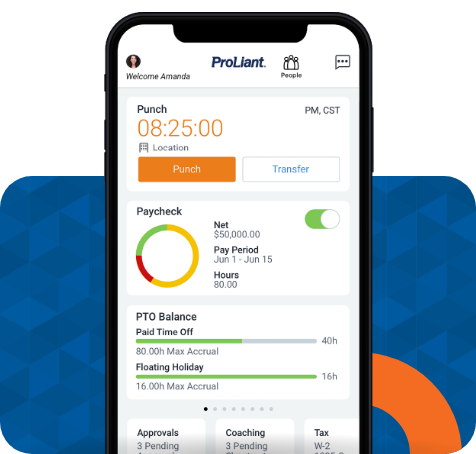
That's where time and attendance software comes into play. ProLiant gives restaurants and SMBs a single platform that connects scheduling, time tracking, and payroll so labor data stays accurate from clock-in to direct deposit.
In this guide, we compare six platforms built for this purpose and explain what features matter most when your workforce runs on shifts, tips, and tight margins.
What should restaurants and SMBs look for in time tracking software?
Restaurants and SMBs should prioritize these capabilities:
- Easy clock-in and clock-out
- Mobile and kiosk time tracking
- Overtime and break alerts
- Scheduling integration
- Payroll integration
- Labor-cost reporting
- PTO and absence tracking
- GPS or geofencing when appropriate
- Manager approvals and audit trails
- Affordable, scalable pricing
The goal is not to buy the software with the longest feature list. It is to choose a system that eliminates manual work while giving managers an accurate picture of who worked, when they worked, and how much that labor costs.
Why restaurants need specialized time tracking
Restaurants have unusually dynamic labor operations. Employees may work changing shifts, split shifts, overtime, late nights, weekends, or different roles during the same pay period. Managers also need to react quickly when employees arrive late, leave early, call out, or stay beyond their scheduled shift.
A restaurant time tracking system should therefore connect scheduling, attendance, timekeeping, and payroll rather than treating each function as a separate process.
For example, a manager should be able to see that an employee was scheduled for eight hours but worked nine, determine whether the extra hour was necessary, and understand its impact on labor costs.
This scheduled-versus-actual view is particularly useful for restaurants because labor demand can change throughout the day and week.
1. Simple clock-in and clock-out
The most important feature is also the easiest to overlook: employees need to be able to clock in and out without friction.
Restaurants may use:
- A tablet or kiosk at the workplace
- A mobile app
- A web browser
- A POS-connected device
- PIN-based clock-in
- Other verification methods, depending on the business
The system should make it easy to correct missed punches without creating additional administrative work.
A complicated time clock can create the very problem it is supposed to solve. If employees forget how to use it or managers constantly have to fix punches, the business has simply replaced paper timesheets with a different form of manual administration.
2. Mobile time tracking and geofencing
Mobile tracking is especially useful for businesses whose employees work away from a central location, such as contractors, cleaning companies, home-service businesses, and field-service teams.
Restaurants can also benefit from location controls when employees clock in from personal devices.
GPS and geofencing can help businesses establish where employees are permitted to clock in. However, these features should be used thoughtfully and with clear employee policies.
For an SMB, the question should not simply be, "Does this software have GPS?" It should be:
"Do we actually need location verification for our workforce?"
A restaurant with one fixed location may get more value from a shared kiosk than from GPS tracking.
3. Overtime tracking and alerts
Overtime can become expensive quickly, particularly for businesses with hourly employees.
Time tracking software should show managers how many hours an employee has worked and alert them when someone is approaching an overtime threshold.
For employers covered by the federal Fair Labor Standards Act (FLSA), covered nonexempt employees generally must receive overtime pay at one and one-half times their regular rate for hours worked over 40 in a workweek. The FLSA also requires covered employers to maintain accurate records of hours worked and wages earned.
That makes overtime visibility both a labor-management issue and a recordkeeping issue.
A good system can help managers answer questions such as:
- Who is approaching overtime?
- Who has already worked overtime?
- Which shifts are creating unexpected labor costs?
- Can another employee cover the remaining hours?
- How much overtime did the business incur during the pay period?
4. Break and meal tracking
Break management is another important consideration for restaurants and SMBs.
Depending on the jurisdiction and applicable employment rules, businesses may have obligations concerning meal periods, rest breaks, and recordkeeping. Time tracking software should therefore support the policies and rules that apply to the employer rather than assuming that one configuration works everywhere.
The Department of Labor notes that employers must accurately record hours worked and that timekeeping methods can vary as long as the records are complete and accurate.
Useful features include:
- Break start and end tracking
- Missed-break notifications
- Manager alerts
- Break-policy configuration
- Exception reports
- Employee timecard review
Software should support compliance, but it does not replace an employer's responsibility to understand applicable federal, state, and local requirements.
5. Scheduling and time tracking in one system
For restaurants, scheduling and time tracking work best together.
A schedule tells managers when employees are supposed to work. A time clock tells them when employees actually worked. Putting those pieces together creates useful information.
This allows managers to identify patterns instead of discovering them when payroll is already due.
6. Payroll integration
Time tracking software should make payroll easier, not create another spreadsheet.
The ideal workflow is:
Employee clocks in → hours are recorded → manager reviews exceptions → timesheet is approved → payroll receives accurate hours.
Payroll integration can reduce duplicate data entry and lower the risk of transcription errors.
Before purchasing software, an SMB should verify that it integrates with the payroll platform it already uses. A feature advertised as "payroll integration" is not necessarily useful if it requires managers to export, clean, reformat, and manually upload data every pay period.
7. Labor-cost reporting
Tracking hours is only half the job. Owners also need to understand what those hours cost.
Useful reports can include:
- Total hours by employee
- Hours by location
- Regular versus overtime hours
- Scheduled versus actual hours
- Labor cost by department
- Labor cost by shift
- Attendance exceptions
- Missed punches
- Payroll-period summaries
For restaurants, labor reporting becomes even more valuable when managers can compare labor levels with sales or operational demand.
The objective is not simply to minimize hours. It is to understand whether the business is scheduling the right amount of labor at the right time.
8. PTO, absences, and attendance
SMBs often manage PTO through a combination of email, spreadsheets, text messages, and verbal requests. That can become difficult as the team grows.
Time tracking software can centralize:
- PTO requests
- Sick days
- Vacation
- Employee availability
- Attendance records
- Time-off approvals
For restaurants, this can also connect availability and time off with scheduling, making it easier for managers to avoid staffing gaps.
9. Employee self-service
A good system should not make the manager the middleman for every timekeeping task.
Employees should be able to:
- Clock in and out
- Review their hours
- Request time corrections
- Submit time-off requests
- View schedules
- See approved changes
This creates a clearer record of what happened and reduces repetitive questions for managers.
It also gives employees an opportunity to identify an incorrect timecard before payroll is processed.
10. Manager approvals and audit trails
Managers need control over timecard changes without making the process cumbersome.
Look for software that records:
- Who changed a time entry
- What was changed
- When it was changed
- Why it was changed, where appropriate
- Who approved the timesheet
An audit trail can be valuable when an employee questions a paycheck or when management needs to investigate a payroll discrepancy.
The federal government does not require employers to use a particular timekeeping format or technology. The important requirement is that covered employers maintain complete and accurate records.
What makes time tracking software good for a small business?
SMBs generally need a different balance of features, cost, and simplicity than large enterprises. The best time tracking solution should be easy to implement so employees can learn it quickly, easy to administer for businesses that may not have dedicated HR or payroll staff, and affordable for the company's size and number of locations.
It should also be scalable as the business grows, integrate with essential tools such as payroll, scheduling, and accounting systems, and provide easy access so owners and managers can review time and attendance information wherever they work.
The U.S. Chamber of Commerce similarly highlights timekeeping features such as exception alerts, reporting, PTO management, GPS/geofencing, and scheduling as important considerations for small businesses.
How much should SMBs spend on time tracking software?
There is no universal "right" price for time tracking software. Instead, businesses should evaluate the total cost of their current process, including how many hours managers spend fixing timesheets, the cost of preparing payroll, how frequently payroll errors occur, unexpected overtime expenses, and the time employees spend submitting corrections.
It is also worth considering whether scheduling and time tracking require separate systems and whether new software could replace other tools. A system that costs more per month can still be less expensive overall if it significantly reduces administrative work, streamlines payroll, eliminates the need for multiple tools, or helps prevent costly payroll mistakes.
The bottom line
Restaurants and SMBs need time tracking software that accurately records hours, reduces administrative work, controls labor costs, and integrates with payroll and scheduling. The best solutions connect the full process, from scheduling and clock-ins to time approvals, payroll, and labor analysis. Ultimately, the best software isn’t the one with the most features; it’s the one that makes accurate time tracking simple for employees and useful for managers.




No Comments Yet
Let us know what you think